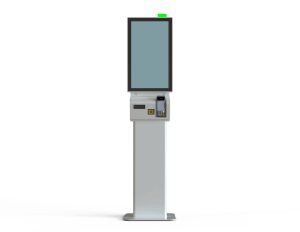
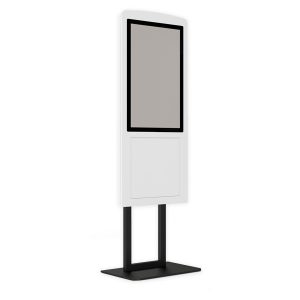
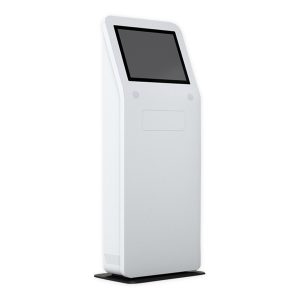
Industrial kiosk systems are used in manufacturing, warehousing, logistics and field operations to make information easier to access, speed up data entry and digitize repetitive tasks. Various processes such as viewing work orders, entering production data, barcode scanning, staff transactions and quality control can be managed from a single kiosk.
Noya Tech industrial kiosk solutions can be configured according to the application, working conditions and required hardware. A touchscreen, industrial computer, barcode scanner, card reader, printer, keyboard and various connectivity options can be combined to create a solution suited to the business’s existing systems.
Share with us the work area where the kiosk will be used, the tasks it will perform, the software it will run and the peripherals needed. Let the Noya Tech team get in touch with you to determine the industrial kiosk model and hardware configuration that fit your site conditions and operational structure.
Computers and terminals used in production areas must keep up with an intensive working pace. Standard office computers may not always meet the needs of production sites in terms of device placement, cable management, user access and environmental conditions.
An industrial kiosk combines computer and touchscreen components in a ready-to-use enclosure. This allows employees to access the applications, instructions and data they need on the production floor from a specific point.
Depending on the business’s use case, industrial kiosk systems can be adapted to processes such as:
The transaction steps on the kiosk can be arranged according to the software used and the business’s operational structure.
Industrial kiosk devices can be used not only on production lines but also in various work areas where users need to perform transactions on a shared terminal.
On production floors, they can be used to view work orders, enter operation start and end information, track products by barcode and record production results.
Having employees perform transactions on a central terminal contributes to a more organized data collection process on the shop floor.
Warehouse kiosks can be used for goods receiving, stock inquiries, shipment verification, barcode scanning and delivery transactions. Hardware added to the kiosk system, such as barcode scanners, card readers or printers, can be configured according to warehouse operations.
Tasks such as entering quality control results, viewing checklists, creating nonconformance records and looking up product information can be performed on a touch kiosk.
Industrial kiosk systems can be used as a shared transaction point for employee logins, shift information, training documents, task assignments and visitor registration.
Maintenance teams can use the kiosk to log faults, view maintenance instructions, enter parts used into the system and record completed work.
Project-specific kiosk solutions can be built for information display, data entry and user authentication needs at checkpoints, technical areas and field operations.
When determining the technical specifications of an industrial kiosk system, screen size alone should not be considered. The operating environment, daily operating hours, number of users, required connections and peripherals should be evaluated together.
The main features that can be considered within the project are:
The hardware to be used should be considered together with the technical requirements of existing ERP, MES, WMS or other enterprise software.
A Panel PC combines a touchscreen and computer components in a compact structure. It is usually mounted on a machine, cabinet, wall or other surface.
An industrial kiosk offers a more complete solution that covers not only the computer system but also the enclosure, mounting structure and required peripherals. Hardware such as printers, barcode scanners, card readers or keyboards can be integrated into the kiosk enclosure.
An industrial kiosk may be more suitable for projects that need a standalone transaction point, while a Panel PC may be better for projects requiring embedded use on a machine or cabinet. The right product should be chosen according to the application and integration needs.
Using industrial kiosks makes it easier for production and field employees to access the information they need directly. Processes carried out on paper forms or different devices can be consolidated at a single digital point.
Depending on the project and software used, industrial kiosk systems can offer the following benefits:
The results achieved may vary depending on the scope of the software used on the kiosk and the business’s processes.
The Noya Tech industrial kiosk category includes the E-Life EK-119, SK-132 and Quixelf QX-27 models. With different display, enclosure and peripheral options, these models can be evaluated according to the project’s application and user needs.
For needs such as data entry on the production floor, shared terminal use, barcode scanning or document viewing, the device’s processor platform, ports and peripheral options should be considered together.
After reviewing your business’s existing software and site conditions, the right kiosk model and hardware configuration can be determined.
Not every manufacturing facility and field operation has the same technical requirements. The environment where the device will be used, the tasks to be performed and the connection to existing systems directly affect the kiosk configuration.
When planning the project, the following should be clarified:
Based on this information, a kiosk system suited to the business’s real needs can be created while avoiding unnecessary hardware costs.
Industrial kiosk prices vary according to screen size, computer platform, enclosure design, connectivity options and the peripherals to be used. Barcode scanners, card readers, thermal printers, keyboards or project-specific enclosure work can affect the total cost.
The following factors are considered in kiosk pricing:
When evaluating an industrial kiosk investment, consider not only the purchase price but also service life, ease of maintenance, service access and total cost of ownership.
You can share your project details via our contact page for the details that affect pricing.
An industrial kiosk is a touch computer system used in manufacturing, warehousing, logistics and field operations for processes such as information display, data entry, barcode scanning and staff transactions. It can be configured with various peripherals depending on the project.
They can be used on production lines and in factories, warehouses, logistics centers, quality control points, maintenance areas and staff transaction points.
Self-service kiosks are mostly intended for customers’ ordering, payment, registration and information transactions. Industrial kiosks are used by production employees and field teams to access operational applications, enter data and track work processes.
Depending on the model and project, hardware such as a 1D or 2D barcode scanner, QR code reader, RFID or card reader can be added to the system.
If the computer and operating system used on the kiosk meet the technical requirements of the relevant software, access to ERP, MES, WMS and similar enterprise applications can be provided. The scope of integration should be evaluated according to the software used.
For projects requiring continuous use, the processor, power supply, cooling design and other hardware should be selected to suit the operating time. The exact operating conditions are determined by the technical specifications of the selected kiosk model.
Depending on the model and project scope, the kiosk enclosure, colors, logo, peripheral layout and mounting method can be customized.
Prices are determined by the display, computer platform, enclosure, peripherals, connectivity options, software requirements, number of devices and scope of technical support.
Your Cookie Preferences
We use strictly necessary cookies to keep our site secure and working properly. Cookies used to measure visit statistics (analytics) and to evaluate the effectiveness of our advertising (marketing) are used only with your explicit consent. You can change your preference at any time via the “Cookie Settings” link at the bottom of the page. Details: Cookie Policy · KVKK Privacy Notice
Cookie Settings
You can choose below which cookie categories you allow. Strictly necessary cookies are required for the site to work and cannot be turned off. Analytics and marketing cookies are used only with your explicit consent under KVKK (Turkish Personal Data Protection Law No. 6698); you can withdraw your consent at any time. Cookie Policy
Strictly Necessary Cookies
Used for displaying pages, security, form submissions, the quote and comparison lists, and remembering your cookie preference. These cookies are not used for personal preference or advertising purposes.
Analytics Cookies
Lets us statistically measure information such as the number of visitors, pages viewed, traffic sources and site performance (e.g., Google Analytics). In this context, data may be transferred to the service provider’s servers abroad.
Marketing Cookies
Used to measure the effectiveness of advertising and remarketing campaigns and to show you content relevant to your interests (e.g., Google Ads, Meta, LinkedIn). In this context, data may be transferred abroad.
Select at least 2 products
to compare