
Box PC systems are computer solutions that provide computer hardware without a display in a compact industrial enclosure and can be integrated into machines, automation, production, image processing and various industrial applications.
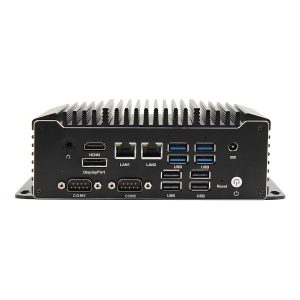
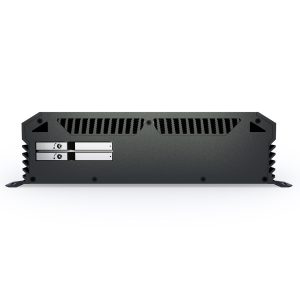
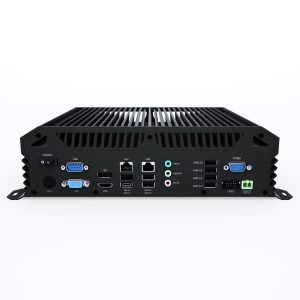
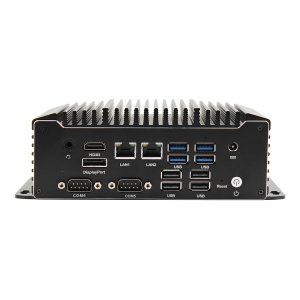
Unlike standard desktop computers, choosing an industrial Box PC involves considering not only processor, RAM and storage capacity but also operating temperature, connectivity options, power input, mounting method, vibration conditions and the system’s continuous operation requirements.
The Noya Tech Box PC product family offers options for a range of applications, from compact fanless computers to industrial systems requiring high performance and expansion capacity. The current category includes compact Nuvo series models as well as other Box PC architectures for higher performance and specialized field applications.
A Box PC is a computer system without an integrated display, in which the core computer components are housed in a compact box-type enclosure.
Industrial Box PCs are typically used to perform the computing function inside a machine or system.
Depending on the application, a Box PC can perform various tasks such as:
Because the display is not integrated, the monitor and computer can be positioned independently. This can be an advantage especially in projects where the computer must be located inside a machine, in an electrical cabinet or at a different point from the operator display.
An industrial Box PC is a computer system that combines the Box PC form factor with the technical requirements of production and field environments.
Depending on the application, industrial Box PCs can offer features such as:
However, not every Box PC has the same features. The device configuration should be determined according to the requirements of the machine and application where the computer will be used.
A fanless Box PC is a computer in which the heat generated by the processor and other components is dissipated through the system’s thermal design without an active fan.
This design can be an advantage especially in dusty production environments.
While fans in standard computers circulate ambient air inside the case, fanless systems have no moving cooling fan. This simplifies the computer’s mechanical structure and can reduce fan-related maintenance.
Fanless Box PCs can be preferred in applications such as:
Noya Tech’s current category also includes compact fanless industrial computer models such as the Nuvo-11000 and Nuvo-11501.
That said, the suitability of a fanless design should be evaluated by considering the processor, system load and ambient temperature.
Thanks to their various connectivity and performance options, industrial Box PCs can form the computing backbone of many industrial systems.
On production lines, the computer may need to communicate with PLCs, sensors, machines or other automation equipment.
With suitable software, a Box PC can run:
In some of these projects, choosing the right I/O and communication interfaces can be more critical than processor performance.
The compact structure of a Box PC allows the computer to be placed inside the machine or close to it.
Especially in systems where the operator display is separate from the computer, an industrial Box PC offers a flexible architecture.
Being able to replace only the computer without touching the display system when the computer fails is also an advantage of modular design.
An industrial Box PC can be used to transfer data from sensors, PLCs and other field equipment to a central system.
Depending on the project, the computer may need connections such as:
The collected data can be processed locally or transferred to the business’s server, ERP, MES or cloud infrastructure.
In camera-based inspection systems, a Box PC can form the computing platform that processes camera images.
For classic image processing applications, an industrial Box PC with suitable CPU performance may be sufficient.
For applications performing intensive AI analysis across multiple cameras, GPU-accelerated Edge AI computers may offer a more suitable system architecture.
The processing requirements of the algorithm to be used in a machine vision project should therefore be determined before selecting the system.
Box PCs can also be used as industrial gateways to transfer data from various field devices to higher-level systems.
They can perform tasks such as protocol conversion, data pre-processing or connection management between field equipment and the central system.
In these applications, network and serial connectivity options come to the fore in addition to computing performance.
Although products of physically similar size exist, industrial Box PCs and consumer-grade mini PCs are not developed for the same purpose.
Standard mini computers are generally intended for office, home or controlled indoor use.
With an industrial Box PC, depending on the project, different requirements can be considered, such as:
It is therefore not correct to choose based only on the physical dimensions of the devices.
The main difference between a Box PC and a Panel PC is the display.
A Box PC provides the computer hardware without a display. If needed, a separate monitor or touchscreen is connected to the system.
A Panel PC combines the display and computer in the same enclosure.
A Panel PC can be advantageous for machine interfaces where the operator uses the device screen directly.
In projects where the computer must be located away from the back of the screen, or where the display and computer must be managed independently, a Box PC can offer a more flexible solution.
The choice should therefore be based not only on the need for a display but also on the system’s maintenance and mounting architecture.
A Box PC is a general class of industrial computer. An Edge AI computer is one whose system design is driven primarily by running AI workloads.
A standard Box PC can be used in applications such as:
In Edge AI computers, the following become more important:
Not every image processing application needs an Edge AI computer. The real processing requirements of the software and algorithm should determine system selection.
NVIDIA Jetson is a specific NVIDIA platform for GPU-accelerated AI and robotics applications.
A Box PC refers to a broader class of industrial computers, independent of processor architecture or manufacturer platform.
A Box PC may be preferred in projects that will run standard x86-based enterprise or industrial software.
In projects that specifically require the NVIDIA Jetson software and AI ecosystem, Jetson-based industrial computers should be considered.
Standard industrial Box PCs can have various features for harsh operating environments. However, not all Box PC models should be assumed to have IP66 or IP67 protection.
In rugged IP66/IP67 computers, enclosure protection against dust and water ingress is one of the core requirements in system selection.
If the computer will operate inside an electrical cabinet or a protected enclosure, a standard industrial Box PC may be sufficient.
In applications where the computer will be directly exposed to dust, water or harsh field conditions, a rugged computer with the required IP protection level should be chosen.
The physical space available for a computer in machines and electrical cabinets may be limited.
In such projects, compact Box PC systems can offer advantages in terms of:
However, as device size decreases, connectivity, expansion and thermal capacity become more important in system design.
Rather than choosing the smallest computer, determine the most suitable form factor that meets the required I/O and performance.
Noya Tech’s current Box PC category includes compact Nuvo models as well as larger, higher-performance industrial systems.
An industrial computer usually works together with other devices.
PLCs, cameras, sensors, barcode scanners, displays, machine control boards or other field equipment may need to be connected to the computer.
For this reason, when choosing a Box PC, connections such as the following should be defined in advance:
Serial communication connections may be required, especially with older machine and automation infrastructure.
In next-generation camera and network applications, multiple Gigabit Ethernet ports or PoE may become more important.
In some industrial projects, the computer’s standard connections may not be enough.
You may need to add special:
In such applications, Box PC models with expansion options such as PCIe can be preferred.
For simpler automation applications, compact computers without expansion slots may be sufficient.
The need for expandability should therefore be determined at the start of the project.
The processor should be chosen according to the real performance requirements of the application that will run on the computer.
Applications such as PLC communication and basic data acquisition do not have the same processor needs as systems performing intensive image processing or running many applications simultaneously.
When choosing a processor, the following should be evaluated together:
Choosing the highest-performance processor is not always the right solution. Unnecessary processing capacity can increase cost and thermal load.
The RAM capacity of a Box PC should be determined according to the requirements of the operating system and applications used.
Higher RAM capacity may be needed in applications where multiple programs will run at the same time or large amounts of data will be processed in memory.
On the storage side, the following should be considered:
In industrial applications, storage options such as SSD and NVMe can be chosen according to system requirements.
Temperature conditions in a machine or production environment can differ significantly from those in an office.
The computer may operate:
The device’s specified operating temperature range must therefore meet the project’s real environmental conditions.
If a wide operating temperature is required, the suitability of not only the computer but also the SSD, RAM and other components should be evaluated.
Industrial systems may use supply voltages different from the power infrastructure of standard office computers.
The Box PC’s power input must therefore be compatible with the electrical infrastructure of the machine or facility.
Systems with a wide DC input range can offer flexibility for use with different industrial power sources.
For systems used on vehicles, additional requirements related to power fluctuations, ignition control and vehicle electronics may arise.
In such projects, it may be better to evaluate Vehicle Computer solutions separately.
How the Box PC will be mounted in the machine or field system is one of the issues that should not be overlooked in device selection.
Depending on the project, the computer can be mounted:
Since mounting orientation can also affect the system’s thermal performance, the installation conditions recommended by the manufacturer should be followed.
Defining the physical space allocated for the computer and the cable connection directions before choosing the device can make integration easier.
When determining the right Box PC for a business or project, look at the entire system architecture, not just the computer’s technical performance.
The following criteria can be evaluated during selection:
For example, a system collecting PLC data on a production line and a computer processing images from multiple cameras do not need the same Box PC configuration.
Defining the workload, environmental conditions and connectivity needs together makes it easier to determine the right system.
Industrial Box PC prices can vary depending on the computer’s hardware and industrial features.
The main factors that can affect cost include:
When comparing Box PCs, rather than looking only at the initial purchase price, also evaluate the computer’s integration with the existing system, whether it provides the required connections directly and its suitability for the operating environment.
Noya Tech offers Box PC solutions for factory automation, machine control, data acquisition, IoT, image processing and other industrial applications.
The current Box PC product family includes compact fanless computers as well as rugged, expandable industrial systems with various I/O options.
The right industrial Box PC configuration can be determined by evaluating the project’s processing performance, connectivity, operating temperature, mounting and expansion requirements together.
Edge AI Computers can also be considered for projects where AI workloads take priority, NVIDIA Jetson Computers for applications that require the NVIDIA Jetson platform, and Rugged IP66/IP67 Computer solutions for field projects requiring high IP protection.
Share with the Noya Tech team the machine or system where the computer will be used, the software to be run, the processing performance, I/O and connectivity needs, operating temperature and mounting conditions.
Contact our team of experts to determine the right Box PC and industrial box computer solution for your production, automation, machine control, data acquisition, image processing or other industrial applications.
A Box PC is a computer system in which the computer hardware is provided without a display in a compact enclosure. Industrial models can be used in automation, machine control, data acquisition and various field applications.
An industrial Box PC is a box computer developed with industrial operating environments in mind. Depending on the model, it can offer fanless operation, a wide temperature range and various industrial I/O options.
A fanless Box PC is a computer cooled through its thermal design and enclosure without an active cooling fan. It can be an advantage especially in dusty industrial environments.
Mini PC is a general term mostly describing size. In an industrial Box PC, operating temperature, I/O, power infrastructure, fanless design and field-use requirements carry more weight in product design.
In a Box PC, the display is separate from the computer. A Panel PC combines the display and computer in the same enclosure. The right solution should be determined by operator display, mounting and maintenance requirements.
This depends on the model, the device’s technical design and the operating environment. For projects requiring continuous operation, check the chosen model’s operating temperature, thermal capacity, power infrastructure and the usage conditions specified by the manufacturer.
Depending on the model, multiple Ethernet ports, serial ports and various industrial I/O options may be available. It is important to determine the required number of ports before choosing the device.
Yes. Box PCs with a suitable processor and camera connections can be used in image processing applications. For projects requiring intensive GPU or AI computing, Edge AI computers may be more suitable.
The price can vary depending on the processor, RAM, storage, I/O, PoE, expansion slots, GPU support, operating temperature, fanless design and other industrial features.
The right Box PC should be determined by the software to be used, processing performance, Ethernet and serial port needs, expansion cards, operating temperature, power input and mounting space. The device should be chosen according to the real application and operating conditions.
Your Cookie Preferences
We use strictly necessary cookies to keep our site secure and working properly. Cookies used to measure visit statistics (analytics) and to evaluate the effectiveness of our advertising (marketing) are used only with your explicit consent. You can change your preference at any time via the “Cookie Settings” link at the bottom of the page. Details: Cookie Policy · KVKK Privacy Notice
Cookie Settings
You can choose below which cookie categories you allow. Strictly necessary cookies are required for the site to work and cannot be turned off. Analytics and marketing cookies are used only with your explicit consent under KVKK (Turkish Personal Data Protection Law No. 6698); you can withdraw your consent at any time. Cookie Policy
Strictly Necessary Cookies
Used for displaying pages, security, form submissions, the quote and comparison lists, and remembering your cookie preference. These cookies are not used for personal preference or advertising purposes.
Analytics Cookies
Lets us statistically measure information such as the number of visitors, pages viewed, traffic sources and site performance (e.g., Google Analytics). In this context, data may be transferred to the service provider’s servers abroad.
Marketing Cookies
Used to measure the effectiveness of advertising and remarketing campaigns and to show you content relevant to your interests (e.g., Google Ads, Meta, LinkedIn). In this context, data may be transferred abroad.
Select at least 2 products
to compare
